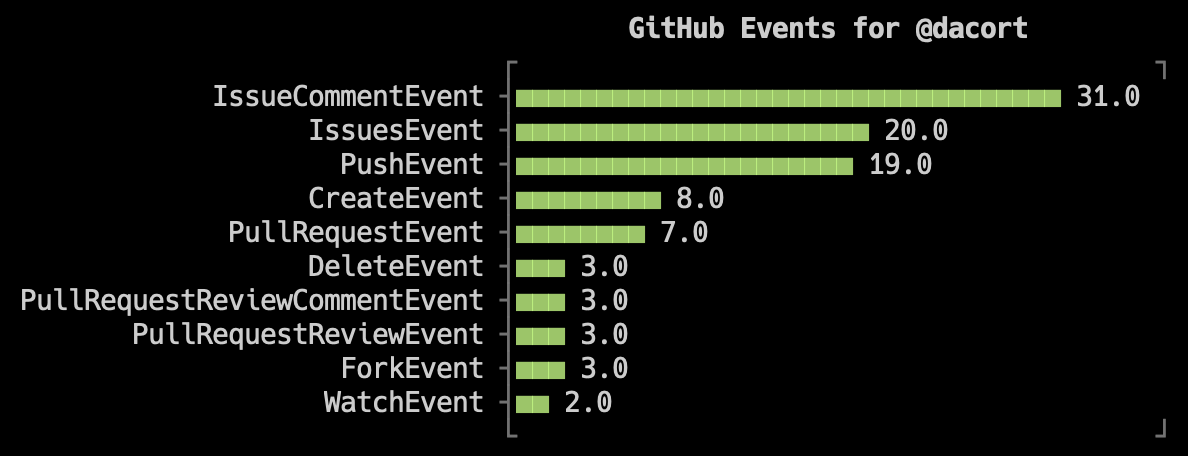
DuckDB can be used with CLI graphing tools to quickly pipe input to stdout to graph your data in one line.
YouPlot is a Ruby-based CLI tool for drawing visually pleasing plots on the terminal. It can accept input from other programs by piping data from stdin. It takes tab-separated (or delimiter of your choice) data and can easily generate various types of plots including bar, line, histogram and scatter.
With DuckDB, you can write to the console (stdout) by using the TO '/dev/stdout' command. And you can also write comma-separated values by using WITH (FORMAT csv, HEADER).
Installing YouPlot
Installation instructions for YouPlot can be found on the main YouPlot repository. If you're on a Mac, you can use:
brew install youplot
Run uplot --help to ensure you've installed it successfully!
Piping DuckDB Queries to stdout
By combining the COPY...TO function with a CSV output file, you can read data from any format DuckDB supports and pipe it to YouPlot. Follow these three steps:
- First, read all data from
input.json:
batch
   duckdb -s "SELECT * FROM read_json('input.json')"
- To prepare the data for YouPlot, write a simple aggregate:
batch
   duckdb -s "SELECT date, sum(purchases) AS total_purchases FROM read_json('input.json') GROUP BY 1 ORDER BY 2 DESC LIMIT 10"
- Finally, wrap the
SELECTin theCOPY ... TOfunction with an output location of/dev/stdout.
The syntax looks like this:
sql
   COPY (⟨query⟩) TO '/dev/stdout' WITH (FORMAT csv, HEADER);
The full DuckDB command below outputs the query in CSV format with a header:
batch
   duckdb -s "COPY (SELECT date, sum(purchases) AS total_purchases FROM read_json('input.json') GROUP BY 1 ORDER BY 2 DESC LIMIT 10) TO '/dev/stdout' WITH (FORMAT csv, HEADER)"
Connecting DuckDB to YouPlot
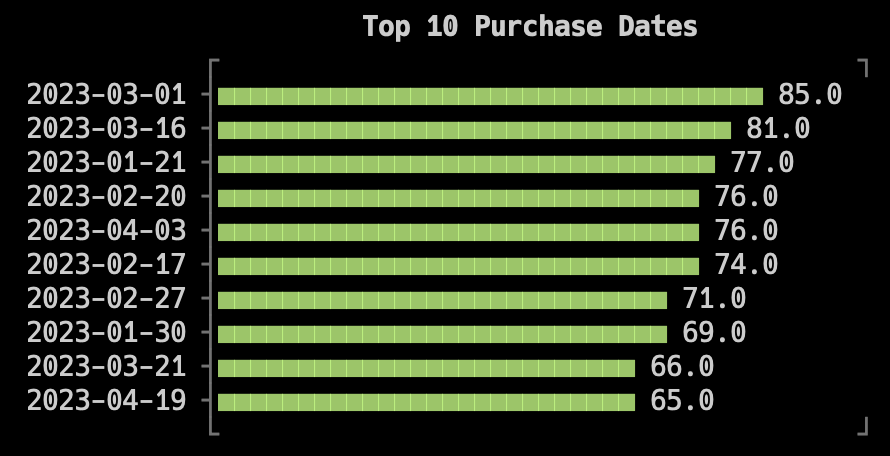
Finally, the data can now be piped to YouPlot! Let's assume we have an input.json file with dates and number of purchases made by somebody on that date. Using the query above, we'll pipe the data to the uplot command to draw a plot of the Top 10 Purchase Dates.
duckdb -s "COPY (SELECT date, sum(purchases) AS total_purchases FROM read_json('input.json') GROUP BY 1 ORDER BY 2 DESC LIMIT 10) TO '/dev/stdout' WITH (FORMAT csv, HEADER)" \
     | uplot bar -d, -H -t "Top 10 Purchase Dates"
This tells uplot to draw a bar plot, use a comma-separated delimiter (-d,), that the data has a header (-H), and give the plot a title (-t).
Additional Example: stdin + stdout
You might be piping data through jq or downloading a JSON file from somewhere. You can also tell DuckDB to read data from another process by changing the filename to /dev/stdin.
Let's combine this with a quick curl from GitHub to see what a certain user has been up to lately.
curl -sL "https://api.github.com/users/dacort/events?per_page=100" \
     | duckdb -s "COPY (SELECT type, count(*) AS event_count FROM read_json('/dev/stdin') GROUP BY 1 ORDER BY 2 DESC LIMIT 10) TO '/dev/stdout' WITH (FORMAT csv, HEADER)" \
     | uplot bar -d, -H -t "GitHub Events for @dacort"